Hi Losant team,
Is there a way to pull in parts of an outer workflow’s payload into the data accessible to a custom edge node, without the user having to enter payload paths every time?
I’m trying to create a custom edge node to integrate with our remote logging solution. I’d like to include some details that are available as part of the default outer payload, like deviceName, agentVersion, applicationName, even specific deviceTags if possible. I understand that the outer payload isn’t accessible per the docs.
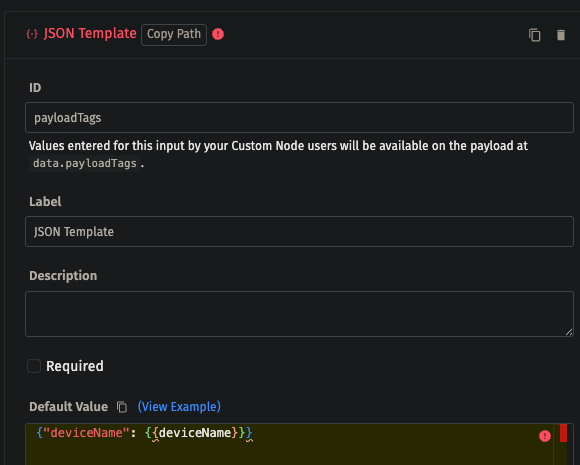
Obviously one could create inputs for each of these, but I don’t want users to have to specify what are essentially constant payload path references, and I haven’t found a way to default them to the correct path. The Payload Path input type does not allow for defaults, and the JSON Template doesn’t propagate templates as shown below (although there may be a different way to structure the JSON that does work).
In short, any guidance on an elegant solution for accessing payload paths from the outer workflow that are invariant to which workflow is running, w/o users having to fill in those parameters, would be excellent so we can get adequate context in our logging tool.
Thanks,
NY
Our philosophy with custom nodes has always been to treat them like a black box - exposing essentially only the information the user feeds in. This was primarily out of security concerns, in the case that a private custom node developer could get their node adopted into another application and have the node feed information about the application back out.
As for your request, I’ll have to run this past the engineering team to see what, if anything, we could automatically expose in the edge environment.
That said, depending on what the values you need, you could potentially look them up from within the custom node. The Agent Config: Get Node exposes some information.
You could also do something like the following - though this would have to be deployed to your device …
- Device: Startup and Application Sync Triggers, both connected to …
- File: Write Node, which writes the values you need to a file on the file system
- Within the custom node, a File: Read Node, which reads the values from the file described above.
Thanks for the speedy response Dylan. I checked out the Agent Config: Get Node, it has some neat info but nothing of immediate utility for our logging objective.
The file write / read path is intriguing…if your team comes back to you without a low-effort solution, I’ll definitely pursue this path at some point, but it’s a bit heavy-handed for our immediate goals.
Minor critique I failed to mention in the original post: the live debug against a test device when developing a custom node is misleading, as it shows these desired properties as available in the payload, which are not there when invoking the node from another workflow.
Perhaps some delineation within the custom node debug pane can aid in distinguishing which ones are and aren’t available when called from outer workflows. I realize this is a niche use case and probably not worth the engineering time, but perhaps a mention of this in the docs or on the debug pane would be worthwhile.
Keep us posted, in the meantime we’ll make do with what’s available to us, no rush. Thanks again!
–NY
Something you could do to make this easier is make a single required payload path field and instruct users to enter “.” (a single period) for the value. This will pass the entire payload through to the edge custom node and you can pull the values from there. This assumes, however, that whatever workflow nodes run before the edge custom node aren’t doing things like moving, deleting, or modifying properties like deviceName.
Thanks a ton Dylan, this suggestion works well and is sufficient for our current needs, custom node is working spectacularly!