First post here, did not find any previous post about this question.
Is it possible somehow to use Losant through plain HTTP, thus not HTTPS?
Reason for this is that I have an old 13.3" e-ink display laying unused and it would be great for e.g. a weather display using Losant.
It has Android 4.04 and a quite old browser version which is not supporting many HTTPS servers, e.g. Losant’s, I’m not able to login from the device. I can’t download new browser versions from Google Play anymore, it might though be possible to sideload APK-files if that would help.
I know this is a long shot, but thought to ask anyhow.
Edit: Found out that the Android version is 4.04. Teoretically possible to update the firmware to 4.4.2 with a good chance of bricking it, and no support is available. But perhaps Android 4.4.2 would not solve my issue?
Thx @Heath for the reply. I have another e-ink display with Android 6 and new enough browser version where Losant is working alright. As that display is being used for work and studying, I can’t though hang it on the wall.
I’ll see if I’m able to find and sideload some browser APK’s to the old e-ink reader, perhaps HTTPS is better supported in some newer versions that would work on Android 4.04.
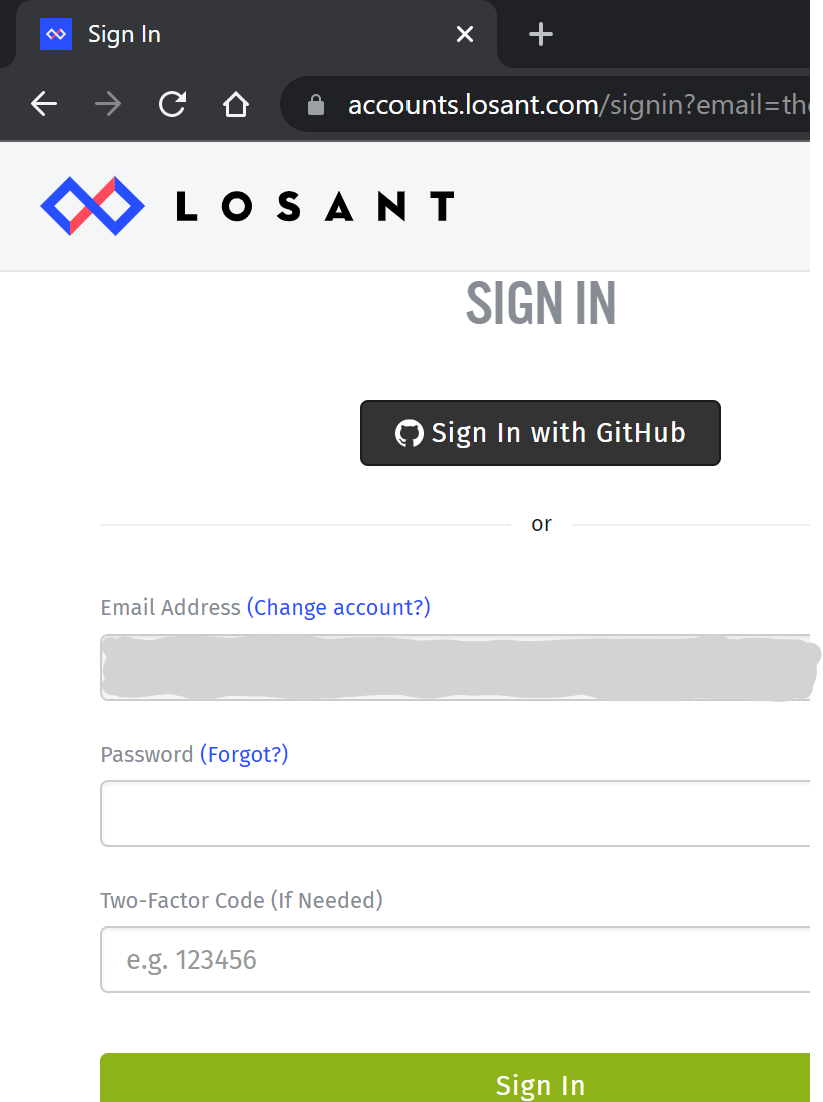
Well, a year has gone, and I took the plunge to upgrade the device to Android 4.4.2. This indeed supports HTTPS fine, but I’m still not able to completely log in to Losant. The issue now is that in Sign In I’m entering my e-mail address and when clicking on continue I’m forwarded to the page shown in the attached screenshot (from a computer). On a computer the e-mail address is filled in, but on this device it is empty and the field is locked so I can’t enter it again. Only the password and two-factor code are possible to fill in, but obviously they don’t help as the e-mail address is empty.
I’ve tried this with several browsers on the device, also in incognito mode, but to no avail.
Javascript is enabled, are there some other specific browser settings to enable?
First, I should note that Android 4.4 was released 8 years ago and is not currently supported by Google, including for security updates. Therefore, Losant also does not officially support it.
Now, in your screenshot, you have blotted out the email address, but you also say here that the email field is not filled in?
Assuming your account is not SSO-linked, you’ll be redirected to a second screen where you can enter your password and, if applicable, your Two-Factor Code.
If your credentials are valid, you should then be redirected to https://app.losant.com.
Are you saying that on this particular Android device, you are reaching the screen with the password and 2FA inputs, but you do not see the email address in the disabled field? If so, my theory is that the address is in fact set (you shouldn’t be able to view this page otherwise) and it is just not rendering in the input (a potential browser bug).
Is your email address in the address bar as a query parameter?
What happens if you enter your account password / 2FA code for your Losant account and submit the form?
Appreciating you taking time to answer! Yes, Android 4.4 is extremely old, but it’s not possible to upgrade this device to a newer version, even upgrading from 4.04 was risky as it could completely have bricked the device. I obviously appreciate Losant is treating security being of very high importance.
My use case is that I’m trying to use the device for something useful instead of throwing it on the electronics pile, and hence I was thinking to use Losant as e.g. a weather dashboard. An e-ink device might not need to be charged for weeks in best cases as minimal power is used until the screen needs to be updated. It is also very eye-friendly, almost looking like paper and with no glare.
Yes, I had blotted out the email address, but this screenshot was from my computer where obviously everything is working perfectly fine. Did not want to take a photo from my device as it is more cumbersome.
On the device the email field is empty even if I do everything the same way as on my computer.
My email address is indeed in the address bar as a query parameter, but for some reason not showing up at the page where the 2FA code can be inserted. It is neither possible to fill in the field which is kind of understandable as it was filled in on the previous page.
I did not have 2FA enabled before, have now enabled it, but it did not help. The error message I receive is "Login failed. An error occurred, credentals_email bust be email format". This message is as such understandable as the email is missing…
As this issue most probably is because of me using an ancient Android version (or strange browser), I’m not expecting Losant to change or redesign anything, but if there’s some setting or workaround available, I’m open to try it. Can I some way e.g. “force” the email address to become filled in, e.g. by having the HTML-file etc. locally on the device?
So it sounds like the email address is getting cleared out of the disabled email input field on the second step - or it’s never being set at all. In usual circumstances, the initial value of that disabled input is populated from the email address found in the query string.
Then, when submitting the signin request with your password and also your 2FA code, Losant is using the email address submitted from the disabled field as opposed to what we have in the session or what’s in the query parameter.
One thing I will recommend to the engineering team - and to be honest, I do not know how quickly they would make this update given this hasn’t been an issue for any users on any devices other than this Android version - is to attempt the authentication using not the value submitted in the form’s body (from the disabled, and in your case blank, email field) but from one of the other sources of truth instead (query or server session).
Thx for suggesting a public dashboard, unfortunately it does not in the end anyhow work on the device. This time no credentials are asked, but the webpage is endlessly (at least for 1 hour) waiting to be rendered, but nothing happens, the “wait circle” is just circling around. So I guess there’s something amiss in the device or browser, lack of memory etc, probably this idea is not going to fly.
On e.g. my mobile phone (and PC etc.) everything works alright so I’m confident everything is ok on Losant side.
With some software like Spacedesk or similar, it is possible to mirror a screen from another computer through VPN (tried this a few years back), so I might try a rPi or similar for mirroring a Losant dashboard, but don’t have the time for this the upcoming months.
If you have some idea for what I could try, pls revert, otherwise I’ll put this on the backburner for now. Anyhow, I’m very thankful for you walking the extra mile trying to get an ancient and unsupported Android version to work!
PS Found the specs for the device, have upgraded from Android 4.0.4 to 4.4.2. As you see, only 512 MB RAM.