# Default image change for each device in the device list
**URL:** https://forums.losant.com/t/default-image-change-for-each-device-in-the-device-list/4556
**Category:** Help
**Tags:** device-list-block
**Created:** [May 26, 2022, 4:25pm UTC](https://forums.losant.com/t/default-image-change-for-each-device-in-the-device-list/4556 "2022-05-26T16:25:34Z")
**Posts on this page:** 20
**Page:** 1
### Author:  [@Joe\_Ka](https://forums.losant.com/u/Joe_Ka)
#### Post date: [May 26, 2022, 4:25pm UTC](https://forums.losant.com/t/default-image-change-for-each-device-in-the-device-list/4556/1 "2022-05-26T16:25:34Z")
Hi Everyone,
I converted an Asset Tracker application template a bit into my own form. With this I want to test the tools and if it works well we will make a more detailed own application.
It has been pretty much redesigned for testing, but there would be two more details that I would like to solve, if not too complicated.
first I want to change the default image in the device list to a custom image for each device and add it from the file list.
Currently, all devices place the default image in the device list
device-list-image-container-be. I want to solve this where an image is assigned to the device instead of the default image.
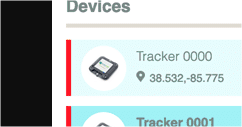
Can anyone help me solve this? Where and how can I add an image to devices in the device list?
Thanks in advance.
---
### Author:  [@Dylan\_Schuster](https://forums.losant.com/u/Dylan_Schuster)
#### Post date: [May 26, 2022, 5:19pm UTC](https://forums.losant.com/t/default-image-change-for-each-device-in-the-device-list/4556/2 "2022-05-26T17:19:46Z")
I would store the path to the image on a device tag, and reference that tag when rendering out the `src` attribute on the image.
If you create a new application from the Industrial Equipment Monitor template]([https://app.losant.com/applications/new?templateId=5e7cfa8b398d1205d5fcc42d](https://app.losant.com/applications/new?templateId=5e7cfa8b398d1205d5fcc42d)), that exact implementation is in place there.
---
### Author:  [@Joe\_Ka](https://forums.losant.com/u/Joe_Ka)
#### Post date: [May 27, 2022, 6:14am UTC](https://forums.losant.com/t/default-image-change-for-each-device-in-the-device-list/4556/3 "2022-05-27T06:14:59Z")
Thanks for the quick response.
> [@Dylan\_Schuster](#):
>
> I would store the path to the image on a device tag, and reference that tag when rendering out the `src` attribute on the image.
could this be a little more detailed?
The current template should be redesigned, I just don’t know where to touch it.
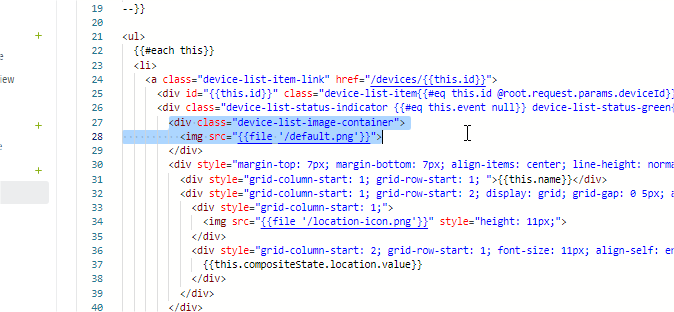
I’m a beginner in Losant.
> [@Dylan\_Schuster](#):
>
> If you create a new application from the Industrial Equipment Monitor template]([https://app.losant.com/applications/new?templateId=5e7cfa8b398d1205d5fcc42d](https://app.losant.com/applications/new?templateId=5e7cfa8b398d1205d5fcc42d)), that exact implementation is in place there.
The proposed template could not be added to the application; it does not currently have the appropriate resources. I don’t want to go deep because it’s just a temporary test app.
There should be a simple solution that can be applied in the current template.
Thk.
Joe
---
### Author:  [@Dylan\_Schuster](https://forums.losant.com/u/Dylan_Schuster)
#### Post date: [May 27, 2022, 2:06pm UTC](https://forums.losant.com/t/default-image-change-for-each-device-in-the-device-list/4556/4 "2022-05-27T14:06:39Z")
Yes, it’s a very simple change.
1. Add a [tag](https://docs.losant.com/devices/overview/#device-tags) to your devices - let’s call it “imagePath” - and set its value to the location of that device’s image in your [application files](https://docs.losant.com/applications/files/). For example, to use the image that’s included in the template, you would set the value of that tag to “/asset-tracker.jpg”.
2. In this file you found, on line 28 (what you highlighted), change the `src` attribute to “{{file this.tags.imagePath}}”.
3. Save the file.
You’re just referencing a value on the device - the tag you added in the previous step - the same way you reference any other value on the device object, using that variable instead of the static value in the `{{file}}` helper.
---
### Author:  [@Joe\_Ka](https://forums.losant.com/u/Joe_Ka)
#### Post date: [May 27, 2022, 3:10pm UTC](https://forums.losant.com/t/default-image-change-for-each-device-in-the-device-list/4556/5 "2022-05-27T15:10:38Z")
Hi,
upp, somehow it doesn’t insert the picture, I think I missed something.
Do you agree? 🙂


---
### Author:  [@Dylan\_Schuster](https://forums.losant.com/u/Dylan_Schuster)
#### Post date: [May 27, 2022, 4:05pm UTC](https://forums.losant.com/t/default-image-change-for-each-device-in-the-device-list/4556/6 "2022-05-27T16:05:09Z")
The code looks right; did you add an “imagePath” tag? Did you set its value the way I mentioned in my last reply? Did you upload a file of that name at the path you specified in the tag value?
Viewing the source of the outputted HTML, what is actually being rendered for each list item’s `![]() ` attribute?
---
` attribute?
---
### Author:  [@Joe\_Ka](https://forums.losant.com/u/Joe_Ka)
#### Post date: [May 27, 2022, 5:19pm UTC](https://forums.losant.com/t/default-image-change-for-each-device-in-the-device-list/4556/7 "2022-05-27T17:19:41Z")
Hi
> [@Dylan\_Schuster](#):
>
> The code looks right; did you add an “imagePath” tag? Did you set its value the way I mentioned in my last reply? Did you upload a file of that name at the path you specified in the tag value?
yes i created the device tag and put the image file in the Files.
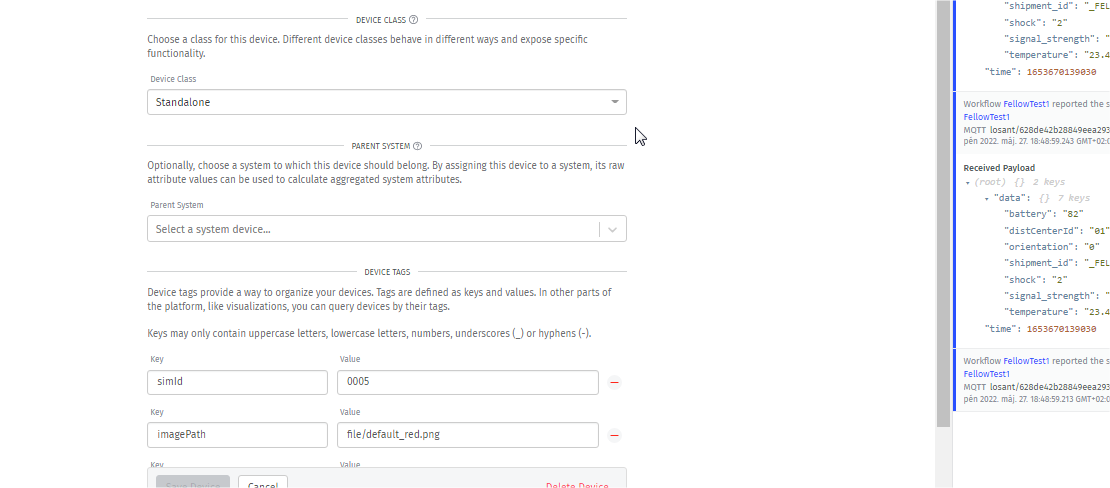

> [@Dylan\_Schuster](#):
>
> Viewing the source of the outputted HTML, what is actually being rendered for each list item’s `![]() ` attribute?
Where can I see this?
---
` attribute?
Where can I see this?
---
### Author:  [@Dylan\_Schuster](https://forums.losant.com/u/Dylan_Schuster)
#### Post date: [May 27, 2022, 5:20pm UTC](https://forums.losant.com/t/default-image-change-for-each-device-in-the-device-list/4556/8 "2022-05-27T17:20:28Z")
Depends on your browser - [How to Read Website Source Code](https://neilpatel.com/blog/how-to-read-source-code/)
---
### Author:  [@Dylan\_Schuster](https://forums.losant.com/u/Dylan_Schuster)
#### Post date: [May 27, 2022, 5:21pm UTC](https://forums.losant.com/t/default-image-change-for-each-device-in-the-device-list/4556/9 "2022-05-27T17:21:49Z")
Your “imagePath” value isn’t following the format from my example; you have in there “file/default\_red.png”. It should begin with a slash (`/`) and, assuming that file is located in the root directory (which I can’t tell from your screenshot), it should be “/default\_red.png”.
---
### Author:  [@Joe\_Ka](https://forums.losant.com/u/Joe_Ka)
#### Post date: [May 27, 2022, 5:55pm UTC](https://forums.losant.com/t/default-image-change-for-each-device-in-the-device-list/4556/10 "2022-05-27T17:55:31Z")
the HTML source doesn’t seem to open the image, I think I may have corrupted the file path.

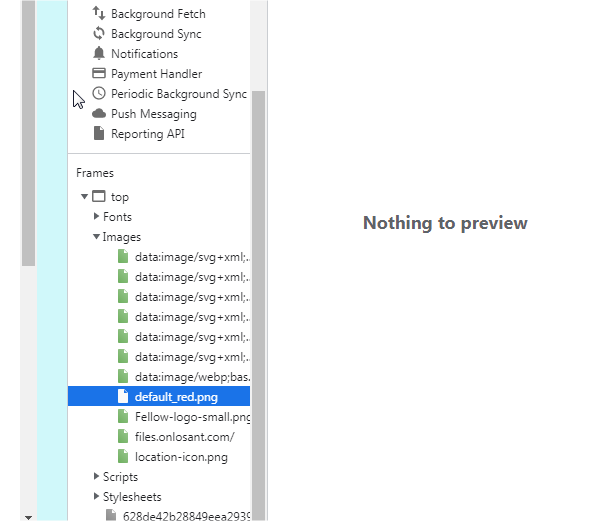
---
### Author:  [@Joe\_Ka](https://forums.losant.com/u/Joe_Ka)
#### Post date: [May 27, 2022, 6:00pm UTC](https://forums.losant.com/t/default-image-change-for-each-device-in-the-device-list/4556/11 "2022-05-27T18:00:09Z")
> [@Dylan\_Schuster](#):
>
> Your “imagePath” value isn’t following the format from my example; you have in there “file/default\_red.png”. It should begin with a slash ( `/` ) and, assuming that file is located in the root directory (which I can’t tell from your screenshot), it should be “/default\_red.png”.
all you need here is: /default\_red.png
and it works.
Thk! 🙂
---
### Author:  [@Joe\_Ka](https://forums.losant.com/u/Joe_Ka)
#### Post date: [May 27, 2022, 6:24pm UTC](https://forums.losant.com/t/default-image-change-for-each-device-in-the-device-list/4556/12 "2022-05-27T18:24:24Z")
i would have another image file question.
I would like to display this image in the pop-up text box by clicking on the map.
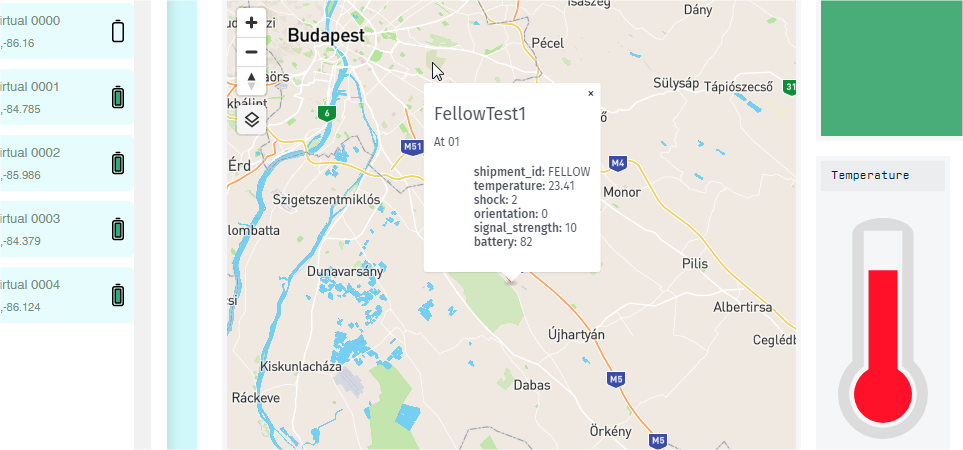
can you help me with that too?
---
### Author:  [@Dylan\_Schuster](https://forums.losant.com/u/Dylan_Schuster)
#### Post date: [May 27, 2022, 6:28pm UTC](https://forums.losant.com/t/default-image-change-for-each-device-in-the-device-list/4556/13 "2022-05-27T18:28:47Z")
The popup [supports Markdown](https://docs.losant.com/dashboards/gps-history/#markdown); using the [available variables](https://docs.losant.com/dashboards/gps-history/#templating-variables) and the [Markdown syntax for rendering an image](https://commonmark.org/help/), you should be able to get the image to render inside of there along with the other variable values.
---
### Author:  [@Joe\_Ka](https://forums.losant.com/u/Joe_Ka)
#### Post date: [May 27, 2022, 7:10pm UTC](https://forums.losant.com/t/default-image-change-for-each-device-in-the-device-list/4556/14 "2022-05-27T19:10:05Z")
do I refer to the device label again?
Can I configure it in the control panel pop-up template?
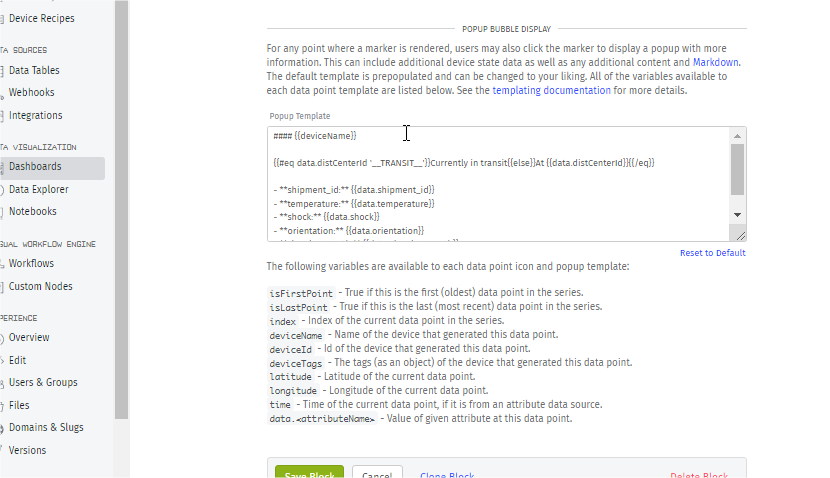
could you write an example code for this too?
---
### Author:  [@Joe\_Ka](https://forums.losant.com/u/Joe_Ka)
#### Post date: [May 31, 2022, 10:47am UTC](https://forums.losant.com/t/default-image-change-for-each-device-in-the-device-list/4556/15 "2022-05-31T10:47:36Z")
Hi Dylan,
i looked it up and read through the forum but couldn’t find an example of this tool image display.
I tried the Markdown function, but the image from the link didn’t work either. I need to display the device image from imagePath, as with img src.
Would you write a line of code for this?
Somehow I didn’t make it.
Thk.
Joe
---
### Author:  [@Dylan\_Schuster](https://forums.losant.com/u/Dylan_Schuster)
#### Post date: [May 31, 2022, 12:30pm UTC](https://forums.losant.com/t/default-image-change-for-each-device-in-the-device-list/4556/16 "2022-05-31T12:30:42Z")
It seems the `{{file}}` helper only works in Experience Views; I’m going to file a ticket about getting that resolved.
In your case, you can get the image to display by writing out the front portion of the URL manually and referencing the tag within it:
```markdown

```
where `626962745d1e901caeb5f9c0` is the ID of the application where the file is stored.
---
### Author:  [@Joe\_Ka](https://forums.losant.com/u/Joe_Ka)
#### Post date: [May 31, 2022, 1:08pm UTC](https://forums.losant.com/t/default-image-change-for-each-device-in-the-device-list/4556/17 "2022-05-31T13:08:59Z")
yes super, it already works. I still need to add the scaling to display it in the specified size. 🙂
can I also adjust the size of the popup window somewhere?
Thk.
Joe
---
### Author:  [@Stephen\_Earthy](https://forums.losant.com/u/Stephen_Earthy)
#### Post date: [August 3, 2022, 5:55pm UTC](https://forums.losant.com/t/default-image-change-for-each-device-in-the-device-list/4556/18 "2022-08-03T17:55:08Z")
Hi Joe,
Were you ever able to add scaling to the image using Markdown? I have tried this, and can’t find any method/syntax that works.
Thanks - Stephen
---
### Author:  [@Joe\_Ka](https://forums.losant.com/u/Joe_Ka)
#### Post date: [November 10, 2022, 7:03am UTC](https://forums.losant.com/t/default-image-change-for-each-device-in-the-device-list/4556/19 "2022-11-10T07:03:13Z")
Hi Stephen,
unfortunately, I didn’t deal with the sizing any more, if you succeeded, please write something. 🙂
Joe
---
### Author:  [@Stephen\_Earthy](https://forums.losant.com/u/Stephen_Earthy)
#### Post date: [November 10, 2022, 5:18pm UTC](https://forums.losant.com/t/default-image-change-for-each-device-in-the-device-list/4556/20 "2022-11-10T17:18:16Z")
Sorry - I did not find a solution. I ended up changing the original image size for the few images I needed.
[Next page](https://forums.losant.com/t/default-image-change-for-each-device-in-the-device-list/4556.md?page=2)