# Custom html block using table

**URL:** <https://forums.losant.com/t/custom-html-block-using-table/2712>\
**Category:** Help\
**Tags:** dashboard\
**Created:** [March 9, 2020, 2:47pm UTC](https://forums.losant.com/t/custom-html-block-using-table/2712 "2020-03-09T14:47:15Z")\
**Posts on this page:** 19\
**Page:** 1

<div class="post-metadata">

**Author:** ![Lars\_Andersson](https://avatars.discourse-cdn.com/v4/letter/l/f05b48/32.png) [@Lars\_Andersson](https://forums.losant.com/u/Lars_Andersson)\
**Post date:** [March 9, 2020, 2:47pm UTC](https://forums.losant.com/t/custom-html-block-using-table/2712/1 "2020-03-09T14:47:16Z")

</div>

Trying to get the custom html table to work as described to show a table from a data table, but I’m not having any luck.  
What does the data table look like that is referenced in the documentation example?  
Just a “time” and “value” field?

---

<div class="post-metadata">

**Author:** ![anaptfox](https://sea1.discourse-cdn.com/flex015/user_avatar/forums.losant.com/anaptfox/32/873_2.png) [@anaptfox](https://forums.losant.com/u/anaptfox)\
**Post date:** [March 9, 2020, 3:29pm UTC](https://forums.losant.com/t/custom-html-block-using-table/2712/2 "2020-03-09T15:29:10Z")

</div>

@Lars_Andersson,

There are two ways for you to discover what this data looks like:

First, if you add this snippet within a `<script>` tag, you can see the data format.

```auto
$(document).ready(function() {
    console.log(DashboardBlock.input);
});

```

This will print that entire object into [Chrome Dev Tools](https://developers.google.com/web/tools/chrome-devtools), where you can inspect the data.

Secondly, If you create a second block with the _exact_ same input, you can see the data format in the block preview:

 ![image](https://us1.discourse-cdn.com/flex015/uploads/getstructure/original/2X/c/c2eea33239e8280a0c72a4bd13781b4a913a1246.png)

---

<div class="post-metadata">

**Author:** ![Lars\_Andersson](https://avatars.discourse-cdn.com/v4/letter/l/f05b48/32.png) [@Lars\_Andersson](https://forums.losant.com/u/Lars_Andersson)\
**Post date:** [March 9, 2020, 4:00pm UTC](https://forums.losant.com/t/custom-html-block-using-table/2712/3 "2020-03-09T16:00:42Z")

</div>

I can see the data in the block preview.

What I’m not clear on is the statement in the loop design starting at .

```auto
input.queries.cost.forEach(function(point) {

```

does “point” need to be replaced with one of my column names or stay as “point”  
I just want to see the fields called “start” which is a date string, and “machine” which is a Number.

---

<div class="post-metadata">

**Author:** ![anaptfox](https://sea1.discourse-cdn.com/flex015/user_avatar/forums.losant.com/anaptfox/32/873_2.png) [@anaptfox](https://forums.losant.com/u/anaptfox)\
**Post date:** [March 9, 2020, 4:13pm UTC](https://forums.losant.com/t/custom-html-block-using-table/2712/7 "2020-03-09T16:13:57Z")

</div>

@Lars_Andersson,

If you’re following this example:

> **[Custom HTML](https://docs.losant.com/dashboards/custom-html/#creating-a-simple-table)**
>
> Learn about adding and configuring a Custom HTML Block on a Losant Dashboard.

It’s pulling from a Time-series query, you will need to rewrite the Javascript to loop through the Data Table Query and add those values to the table.

Here are some great resource to help you write the Javascript:

[https://eloquentjavascript.net/](https://eloquentjavascript.net/)

[https://www.w3schools.com/js/default.asp](https://www.w3schools.com/js/default.asp)

---

<div class="post-metadata">

**Author:** ![Lars\_Andersson](https://avatars.discourse-cdn.com/v4/letter/l/f05b48/32.png) [@Lars\_Andersson](https://forums.losant.com/u/Lars_Andersson)\
**Post date:** [March 9, 2020, 4:40pm UTC](https://forums.losant.com/t/custom-html-block-using-table/2712/8 "2020-03-09T16:40:00Z")

</div>

I get that I need to change the Javascript to handle the data datble query instead of a time series query, I just can’t find a good example of how that is done.

---

<div class="post-metadata">

**Author:** ![anaptfox](https://sea1.discourse-cdn.com/flex015/user_avatar/forums.losant.com/anaptfox/32/873_2.png) [@anaptfox](https://forums.losant.com/u/anaptfox)\
**Post date:** [March 9, 2020, 9:32pm UTC](https://forums.losant.com/t/custom-html-block-using-table/2712/12 "2020-03-09T21:32:37Z")

</div>

@Lars_Andersson,

I’ve created this example for you:

To test this out, you can use import this as an example Data Table:

[warnings\_and\_alarms.csv](https://forums.losant.com/uploads/short-url/HXKNDRJ4GMaA4LoyusF33ZQd5j.csv) (4.3 KB)

Then, while configuring the block,

 ![image](https://us1.discourse-cdn.com/flex015/uploads/getstructure/original/2X/e/e0361ab4329fc41e5204ef7d4343763b677d6617.png)

In the screenshot above, notice that the “Query Name” is `warnings`.

Here is the head content:

```auto
<link
  rel="stylesheet"
  href="https://stackpath.bootstrapcdn.com/bootstrap/4.3.1/css/bootstrap.min.css"
/>
<script src="https://code.jquery.com/jquery-3.3.1.slim.min.js"></script>
<script src="https://cdnjs.cloudflare.com/ajax/libs/popper.js/1.14.7/umd/popper.min.js"></script>
<script src="https://stackpath.bootstrapcdn.com/bootstrap/4.3.1/js/bootstrap.min.js"></script>
<script src="https://cdnjs.cloudflare.com/ajax/libs/moment.js/2.24.0/moment.min.js"></script>
<style>
  body {
    padding: 10px;
    margin: 0px;
    background: transparent;
  }
</style>
<script type="text/javascript">
  function renderBlock(input) {
 
    if (DashboardBlock.input.queries.warnings) { // check ot see if the query was successfull
      $('#table-body').empty() // empty table on re-render
      // loop through each point and append row to table
      input.queries.warnings.items.forEach(function(row) {
        $('#table-body').append(`
              <tr>
              <td>${row.warning_or_alarm ? 'Alarm': 'Warning'}</td>
              <td>${row.description}</td>
              </tr>
          `)
      })
    }
  }

  DashboardBlock.on('queryChange', renderBlock)
</script>

```

To access that data, we can use `DashboardBlock.input.queries.warnings`. You configured the key `warnings` in the query above.

Then, we can access each row like so `row.description`.

Here is the body content:

```auto
<div class="container-fluid">
  <table id="table" class="table table-dark">
    <thead>
      <tr>
        <th scope="col">Type</th>
        <th scope="col">Description</th>
      </tr>
    </thead>
    <tbody id="table-body"></tbody>
  </table>
</div>

```

Here is the desired result:

 ![image](https://us1.discourse-cdn.com/flex015/uploads/getstructure/original/2X/2/2dbc7257190d4dbfbe0fedffac17954b74aa3c4f.png)

As you can see, this example isn’t too different from the others, It all depends on how you’re referencing and accessing the queries and its data.

Let me know if this helps 🙂

---

<div class="post-metadata">

**Author:** ![Lars\_Andersson](https://avatars.discourse-cdn.com/v4/letter/l/f05b48/32.png) [@Lars\_Andersson](https://forums.losant.com/u/Lars_Andersson)\
**Post date:** [March 9, 2020, 10:02pm UTC](https://forums.losant.com/t/custom-html-block-using-table/2712/13 "2020-03-09T22:02:52Z")

</div>

Thanks. I’m all good now.

---

<div class="post-metadata">

**Author:** ![Lars\_Andersson](https://avatars.discourse-cdn.com/v4/letter/l/f05b48/32.png) [@Lars\_Andersson](https://forums.losant.com/u/Lars_Andersson)\
**Post date:** [March 10, 2020, 7:54pm UTC](https://forums.losant.com/t/custom-html-block-using-table/2712/16 "2020-03-10T19:54:19Z")

</div>

When creating the query from a data table as above, is there a way to sort the returned rows?

---

<div class="post-metadata">

**Author:** ![JuliaKempf](https://sea1.discourse-cdn.com/flex015/user_avatar/forums.losant.com/juliakempf/32/2446_2.png) [@JuliaKempf](https://forums.losant.com/u/JuliaKempf)\
**Post date:** [March 10, 2020, 8:24pm UTC](https://forums.losant.com/t/custom-html-block-using-table/2712/18 "2020-03-10T20:24:58Z")

</div>

Hi @Lars_Andersson,

This functionality is not currently supported when querying, so sorting would have to be done after fetching the rows. However, I am creating a Feature Request for this as it would be a valuable addition to the block. I will update you should this be implemented in the near future!

Thanks,  
Julia

---

<div class="post-metadata">

**Author:** ![Josh\_Bell](https://sea1.discourse-cdn.com/flex015/user_avatar/forums.losant.com/josh_bell/32/2554_2.png) [@Josh\_Bell](https://forums.losant.com/u/Josh_Bell)\
**Post date:** [June 8, 2020, 1:33am UTC](https://forums.losant.com/t/custom-html-block-using-table/2712/20 "2020-06-08T01:33:33Z")

</div>

Hi @anaptfox, along the same lines as this query. I am using the custom HTML block to render a table. I notice it will only return 1000 lines of that table, is there a way to either extend this, or a way to filter to the last 3days worth of data?

---

<div class="post-metadata">

**Author:** ![Heath](https://sea1.discourse-cdn.com/flex015/user_avatar/forums.losant.com/heath/32/3036_2.png) [@Heath](https://forums.losant.com/u/Heath)\
**Post date:** [June 8, 2020, 3:02pm UTC](https://forums.losant.com/t/custom-html-block-using-table/2712/24 "2020-06-08T15:02:56Z")

</div>

Hi @Josh_Bell!

I’ve dug into this, and it looks like the query limit for that block is 1000 lines. That limit is being imposed by the query section, not the HTML.

I’m following up with our team to see what the next best steps are for this and will follow up when I have an answer.

---

<div class="post-metadata">

**Author:** ![Josh\_Bell](https://sea1.discourse-cdn.com/flex015/user_avatar/forums.losant.com/josh_bell/32/2554_2.png) [@Josh\_Bell](https://forums.losant.com/u/Josh_Bell)\
**Post date:** [June 8, 2020, 6:55pm UTC](https://forums.losant.com/t/custom-html-block-using-table/2712/26 "2020-06-08T18:55:26Z")

</div>

Hi @Heath_Blandford1 is there a way I can make the table build from the top down instead? I wouldn’t mind the 1000line limit if it gave me the most recent 1000 rather than the 1st 1000.

Josh Bell

---

<div class="post-metadata">

**Author:** ![Heath](https://sea1.discourse-cdn.com/flex015/user_avatar/forums.losant.com/heath/32/3036_2.png) [@Heath](https://forums.losant.com/u/Heath)\
**Post date:** [June 8, 2020, 9:21pm UTC](https://forums.losant.com/t/custom-html-block-using-table/2712/27 "2020-06-08T21:21:52Z")

</div>

Hey @Josh_Bell,

Unfortunately, there isn’t a way to sort dashboard table queries in the Custom HTML block. I have created a Feature Request for sorting queries. I will update you should this be implemented in the near future!

What type of the three dataset queries are you using for your Custom HTML block?

Thanks!  
Heath

---

<div class="post-metadata">

**Author:** ![Josh\_Bell](https://sea1.discourse-cdn.com/flex015/user_avatar/forums.losant.com/josh_bell/32/2554_2.png) [@Josh\_Bell](https://forums.losant.com/u/Josh_Bell)\
**Post date:** [June 8, 2020, 9:38pm UTC](https://forums.losant.com/t/custom-html-block-using-table/2712/28 "2020-06-08T21:38:18Z")

</div>

Hi @Heath

I am only using the data table query to pull the data in from one of my data tables.

Josh

![image001.jpg](https://us1.discourse-cdn.com/flex015/uploads/getstructure/original/2X/2/2485d26919316b1d80aa60f5ca8e2cb5bc0275fe.jpeg)

---

<div class="post-metadata">

**Author:** ![Heath](https://sea1.discourse-cdn.com/flex015/user_avatar/forums.losant.com/heath/32/3036_2.png) [@Heath](https://forums.losant.com/u/Heath)\
**Post date:** [June 8, 2020, 9:58pm UTC](https://forums.losant.com/t/custom-html-block-using-table/2712/29 "2020-06-08T21:58:13Z")

</div>

@Josh_Bell

Oh, great!

Have you considered using a [Data Table block](https://docs.losant.com/dashboards/data-table/)?

This option isn’t as customizable as a Custom HTML block, but it will show all the rows of the selected Data Table with 1,000 rows per page. You can sort ascending/descending `updatedAt` and `createdAt` by default, as well as any other column you may have. Although, you can only sort ascending/descending on the block itself, you can query the table in the block configuration to return a subset of your table’s rows.

As I mentioned before, I have created a Feature Request for sorting queries, and will update this thread should it be implemented.

Thanks,  
Heath

---

<div class="post-metadata">

**Author:** ![Josh\_Bell](https://sea1.discourse-cdn.com/flex015/user_avatar/forums.losant.com/josh_bell/32/2554_2.png) [@Josh\_Bell](https://forums.losant.com/u/Josh_Bell)\
**Post date:** [June 8, 2020, 10:04pm UTC](https://forums.losant.com/t/custom-html-block-using-table/2712/30 "2020-06-08T22:04:07Z")

</div>

@Heath  
Yes I started out using that block but unfortunately you cant seem to customize which columns are displayed meaning you get the annoying default “id”, “createdAt” and “updatedAt” columns displayed. I moved to the custom HTML block to get around this.

---

<div class="post-metadata">

**Author:** ![Josh\_Bell](https://sea1.discourse-cdn.com/flex015/user_avatar/forums.losant.com/josh_bell/32/2554_2.png) [@Josh\_Bell](https://forums.losant.com/u/Josh_Bell)\
**Post date:** [June 14, 2020, 8:56pm UTC](https://forums.losant.com/t/custom-html-block-using-table/2712/31 "2020-06-14T20:56:37Z")

</div>

@Heath  
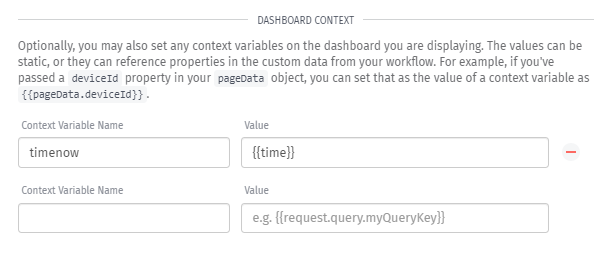
I thought i might be able to do this in my experience page by passing the current time using a context variable then doing some math on it to subtract time, however this doesn’t seem to be working. I have created the number variable {{ctx.timenow}} and have set this to {{time}} on my experience page, but it doesn’t seem to pass through:  
 ![image](https://us1.discourse-cdn.com/flex015/uploads/getstructure/original/2X/4/4f82eeb8052775c76022f2530ed36ce0b4b67751.png)  
 ![image](https://us1.discourse-cdn.com/flex015/uploads/getstructure/original/2X/c/cc0b2681352d996aeafd4c11ecfce3641f608a7d.png)  
 ![image](https://us1.discourse-cdn.com/flex015/uploads/getstructure/original/2X/e/e76a5d6d08f9e08a54d32e762556c371fc08a8cd.png)  
to test if the time is being passed through I referenced it in the block title:

 ![image](https://us1.discourse-cdn.com/flex015/uploads/getstructure/original/2X/1/14e91b82eecd8b8852c92f837705ba2e9a8641a4.png)  
but when i render the experience page it stays at the default value:  
 ![image](https://us1.discourse-cdn.com/flex015/uploads/getstructure/original/2X/b/b9d13c9836996c307bee76c338592de58a436e76.png)

Is there a reason this isn’t working as i thought it might?

thanks

---

<div class="post-metadata">

**Author:** ![Heath](https://sea1.discourse-cdn.com/flex015/user_avatar/forums.losant.com/heath/32/3036_2.png) [@Heath](https://forums.losant.com/u/Heath)\
**Post date:** [June 18, 2020, 7:13pm UTC](https://forums.losant.com/t/custom-html-block-using-table/2712/34 "2020-06-18T19:13:29Z")

</div>

Hey @Josh_Bell,

In the Dashboard Context configuration on the Page settings, you can use the `formatDate` [Format Helper](https://docs.losant.com/workflows/accessing-payload-data/#format-helpers).

![image](https://us1.discourse-cdn.com/flex015/uploads/getstructure/original/2X/5/5ac6c969d817dc1c2dfb778b212d68f8a1a8decd.png)

![image](https://us1.discourse-cdn.com/flex015/uploads/getstructure/original/2X/9/9301563c1de365c867fb972cfe84e33fec0b7f75.png)

Let me know if you have any more questions!

Heath

---

<div class="post-metadata">

**Author:** ![Josh\_Bell](https://sea1.discourse-cdn.com/flex015/user_avatar/forums.losant.com/josh_bell/32/2554_2.png) [@Josh\_Bell](https://forums.losant.com/u/Josh_Bell)\
**Post date:** [June 19, 2020, 1:42am UTC](https://forums.losant.com/t/custom-html-block-using-table/2712/37 "2020-06-19T01:42:39Z")

</div>

thanks, not quite what i was looking for but I solved it myself anyway. I created an experience workflow to specifically pass the time/date back as a {{pageData}} object for that page, so i used that workflow to format the date, subtract 31days off it then pass it back to the ctx variable. I then use a filter on the dashboard block to only give me data greater than my ctx variable, this means I don’t hit the 1000line limit, convoluted but it works.